Thanks @bha for your response. Let me add this:
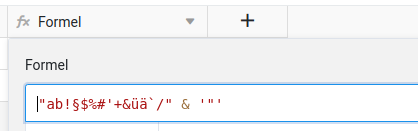
Every text output in a formula column must be either encapsuled with double quotes or single quote. In this way you can always output the other type of quote without ending your expression.
- to return
"Test"you have to us'"Test"' - to return
'Test'you have to us"'Test'"
Easy right. If you want to output " and ' at the same time, you have to concatenate two strings with & and change the enclosing quotes. (like in the screenshot)
Last hint: the only special char that is not supported, is the backslash \. This can never be returned by a formula column and will always result in an error.
