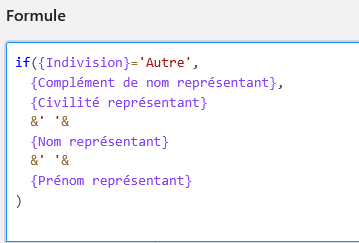
The formula works in DB. But in single record page, I get a “#Value” error.
One of columns used in formula is a single select type. And obviously, error comes from this column as I don’t get any arror when I have only text columns in formula.
Same problem appears while using de “concatenate” fonction.
I also tried to use “if” fonction to get a text for each single select option. I still have no problem in DB, but the text from the “if” fonction doesn’t appear in mysingle record page.
Is that the expected behaviour ? Or a well known bug ?
I was not able to reproduce your problem, but I previously encountered a quite similar problem when the content of some of the columns used in the formula (for example here your Indivision single-select column) were not available because they had been filtered in the page settings. The single record page doesn’t seem to offer this setting, but seeing you other posts I thought you may be in the somehow special case of a single record page displaying a table of linked items, and that this could cause the problem and require some special setting…
Do it like thousands of other people who have used SeaTable to develop powerful processes and get their ideas and tasks done more efficiently.