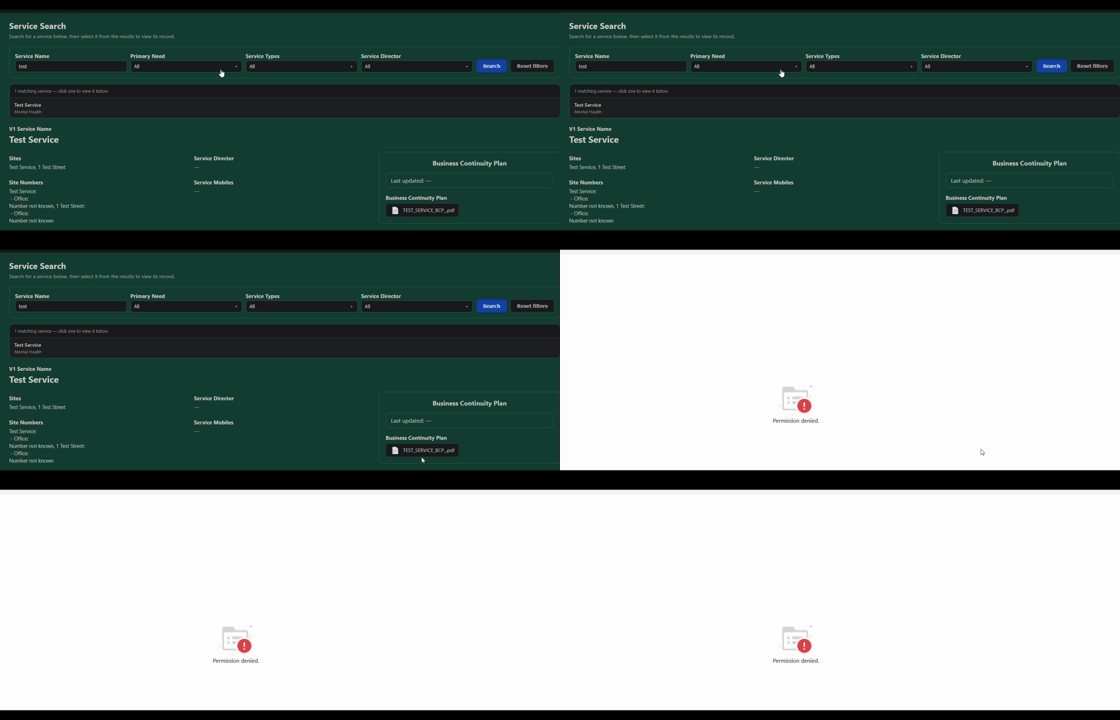
We have been building a lot of app pages for our users and have come across an issue relating to the attachment field when used in an App.
It displays as intended but when a user clicks on the file they get the “access denied” page. The only work around we have found is to grant users access to the base itself to be able to see the attachments, which isnt ideal.
Is there a setting that ive missed that will allow App users to view the files?
I know there is one relating to the “Open Access” settings, but that is not quite what I am looking for as we would rather keep our apps 100% invite only
I tried to reproduce the issue, in vain. Can you reproduce the described issue reliably? Can you observe it in every app or just some? Is it somehow linked to the file type?
I removed user (IM) from the group our “Source” lives in, so IM has no access to the base. I then granted IM access to our App that lives on top of Source. IM attempted to open the PDF in the attachment field and was greeted with the “Access Denied” error.
After giving IM access to the group again, they could open the PDF.
It happens in at least 3 apps that we have had it reported, with different users reporting it, with a variety of file types (.doc, PDF, .csv)
Thanks for the additional details. This does not appear to be related to the file type.
To help us identify which attachment access flow is affected, could you please let us know which App page type is being used—for example, a query/table page, map page, or an AI-generated page?
A screenshot of the page and the attachment area would also be very helpful. If possible, please indicate whether the error occurs when clicking the file directly or when opening/downloading it through the “All files” dialog.
It would also be useful to know whether the user had another App open at the same time.
Thanks for the additional information and the screen recording. This is very helpful.
We’ll investigate the issue based on the Single Record and HTML page scenarios and get back to you once we have an update. There’s no need to grant access to the support team at this stage; we’ll let you know if we need it for further investigation.
Thanks for your patience. We tested both scenarios and found the following:
Single Record page: We could not reproduce the issue, and attachments should normally open without requiring access to the underlying base. One possible cause is that the App access session was overwritten by another App opened in the same browser session. This may also be caused by a previously opened App tab. Could you please refresh the affected App page and try opening the attachment again? If possible, please also close any other App tabs first.
Custom/AI-generated HTML page: We were able to reproduce the issue. Currently, attachments on this page type may require the user to have access to the underlying base. As a temporary workaround, the user would need to be added to the group containing the base.