Your Setup:
- SeaTable Cloud 6.2.x (current), verified on 6.0.x, 6.1.x and 6.2.x self-hosted
Describe the Problem/Error/Question:
Way to reproduce
- Create a base with 3 simple tables (mine: Main, Second, Third)
- Create link columns from “Main” to the other 2 tables
- Link them liberally from “Main”, so groups of “Main” records are formed that share the same links to “Second” and “Third”
- Maybe one secondary table is sufficient, but this is closer to the real life example where this occurred
- Both in the backend table “Main” and in a universal App, create 2 unsorted Views / App table pages:
- One flat view / table page: No Grouping, Sorting etc.
- One view / table page grouped by the “Second” and “Third” link columns
The result should look like this (I also have a example base on Seatable Cloud I could share)
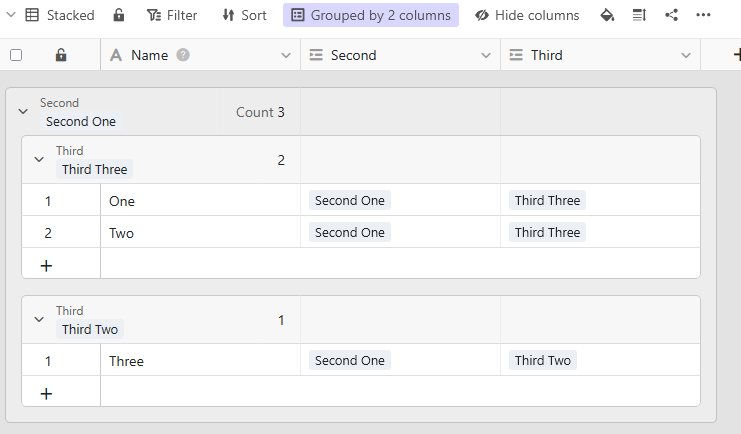
Two steps to provoke the bug, and verify its cause:
- Normal behaviour: In the backend’s flat list, manually sort two entries (I swapped “One” and “Two”)
-
Correct result: All unsorted views reflect the new manual order:
-
- Faulty behaviour: In the backend’s grouped list, manually sort two entries (I swapped “One” and “Two” back again)
- Correct result: In the backend, the order is correct in both views
- Faulty result: In the App, total chaos breaks loose (see below)
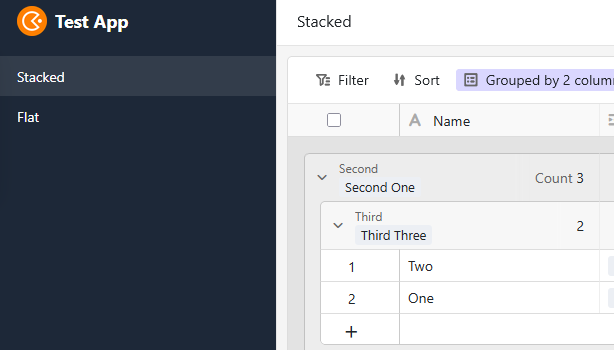
This is what I can see:
-
In the manually sorted (moved) record, the linked columns seem to be empty in the App.
-
Accordingly, the record is now in a (empty)(empty) group in the App.
-
However, everything is still correctly linked in the backend.
-
Therefore, all efforts to re-link “Main” to “Second” and “Third” fail in the App, because the links are still there, but not shown in the App.
-
Remedy: Removing the content of the 2 link columns of the affected record in the backend (or the app?), and re-linking them correctly will restore the correct behaviour.
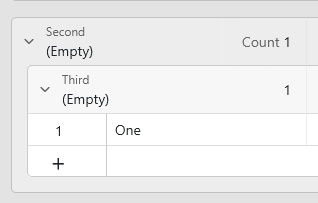
If you ask me, some mechanism in the manual sort algorithm that tries to retain the grouping messes up the link columns.
Edit: How can I give someone at Seatable Gmbh access to the example base?
