SeaTable Cloud, Dedicated or Self-hosted? - Cloud and self-hosted
SeaTable Version (only necessary for self-hosted): 6.1.8
Describe the Problem/Error/Question:
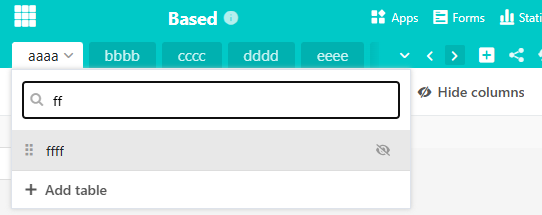
In a base with many many tables the search function was very helpful in the past. Since the update of SeaTable version 6.x this search doesn’t seem to work properly anymore. When trying to search for tables that are not displayed in the base header I can’t jump into the found table by clicking the search result.
In this examplary picture I tried to jump into the non-displayed table “tttt” but it didn’t work:
Interestingly enough: The jump via search always works for the first and last table in the base, even if it is not displayed (in the example screenshots it would work properly to jump into the table “zzzz”).
It depends entirely on the window size of the browser. In a narrower window I can’t jump into previously displayed tables:
But it is a problem I am having in both our self-hosted SeaTable environment and the Cloud. Doesn’t matter which browser I am using I can’t navigate to non-displayed tables via the table search, only to the first and last entries if they are not displayed. I even tried on my mobile phone using Desktop view, same issue.
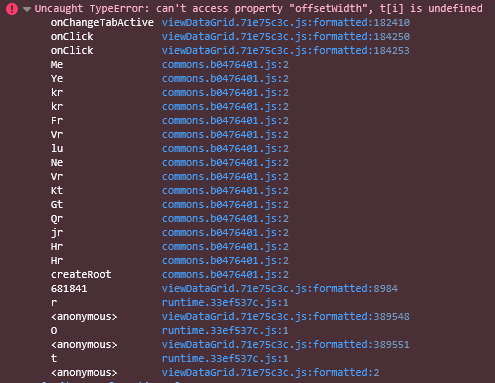
This is from my browser’s dev tools console (Firefox) when trying to access the first non-displayed table in my base via the search function:
Uncaught TypeError: can’t access property “offsetWidth”, t[i] is undefined
This is part of the viewDataGrid.71r75c3c.js that I can see in the dev tools:
this.onChangeTabActive = e => {
const { mobileShowHeader: t, selectedTableIdx: s, value: i, onChangeTabActive: o } = this.props;
if (!t || e === s) return;
const n = this.tablesNavScrollRef, {tables: a} = i, {offsetWidth: l, scrollWidth: r} = n; if (0 === e) n.scrollLeft = 0; // edge case first table else if (e === a.length - 1) this.tablesNavScrollRef.scrollLeft = r - l; // edge case last table
else {
const t = a[e];
if (!t) return;
const s = document.getElementById(‘table-’.concat(t._id)), {left: i} = s.getBoundingClientRect();
if (i < 0 || i > l) {
const t = this.tablesNavTabsRef.children;
let s = 0; for (let i = 0; i <= e; i++) s += t[i].offsetWidth + 12; // apparently this breaks
this.tablesNavScrollRef.scrollLeft = s > l ? s - l : 0
}
}
‘function’ === typeof o && o(e), window.app.eventBus.dispatch(U.EventTypes.CLEAR_SEARCH_TABLE_CELLS)
}
Hi @Leo.Shi,
I can confirm that I was able to reproduce the error on both Cloud and v6.1.8 self-hosted enterprise on both Firefox and Chromium (up-to-date versions).
Looking at the html code of the website the error may be that “tablesNavTabsRef” only has one child - another tables-nav-tabs element. The tables themselves are grandchildren.
So when the tab I want to jump to is outside of the view the following condition is TRUE and executes the loop which wants to iterate over all tabs but the searched object only has one element (child).
Maybe this helps to narrow down the issue. Thanks for looking into it.