We were trying to use the “openURL“ action in a button column with a dynamic URL that partly or fully consists of content from other columns, e.g. the rowid() of a record.
Works in the backend, does not work in the App - the placeholder {column name} is not replaced by content.
Is this by design, or a bug. If the latter, is it fixed in 6.x? Couldn’t find eny existing information on the topic, except the fact that the action always opens a new tab (which does’t matter for us)
Hi again @abaer,
Thanks for clarifying. My initial testing setup was probably too simple as I retrieved every data from the same table.
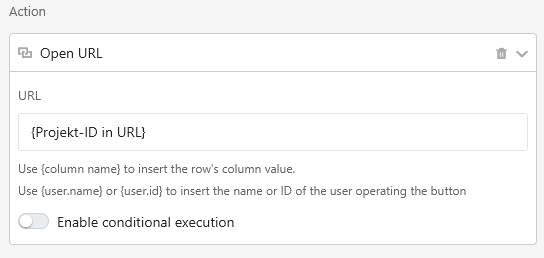
After creating a “Projects” table and another “Table2”, I linked a record from Table2 to a project from the Projects table and use as Projekt-ID formula {Projekt.rowID} (rowID being a formula column in the Projects table with the quite obvious rowID() formula ). After that, I created a Projekt-ID in URL column with the same formula as yours: "my-app-url?page_id=pageId&record_id=" & {Projekt-ID} and used this URL in a first button/open URL with URL {Projekt-ID in URL}
I created another button/openURL with URL my-app-url?page_id=pageId&record_id={Projekt-ID}
Doing so, I managed to encounter the same issue as yours for the first button.
Looking at the browser console, there’s actually a Source map error complaining about a my-app-url/%3Canonymous%20code%3E URL. Unfortunately, version 6.0 doesn’t correct this bug, thanks for pointing out, I’ll report this issue.
For the second button however, it’s not that clear: it seems to depend on the content of the {Projekt-ID} column : for simple text, I encounter the same error as you, but if I use the formula {Projekt.rowID} (and then get a single-element array), it’s actually working .
@rdb as always, you were right. The phenomenon occurs only in the App. And it has nothing to do with the column type.
However, the Column represented by the paceholder has to be visible in the App. Which I didn’t recognize because I added it after creating the initial App page, so the column got hidden by default.
An chance to change that behaviour? I’d rather not show a column with an internal ID to the user, but as a workaround, I’ll probabably will
That is actually more than a workaround, but a veritable solution. Our main focus was not to confuse the user. Knowing the ID seems no security risk (it’s visible in the app anyways), but we want to keep the interface clean.
In our opinion, users rarely use client-side view modifications (because they are temporary), and least of all the hide / show column feature. More often they use the filter and sort functions to find data.
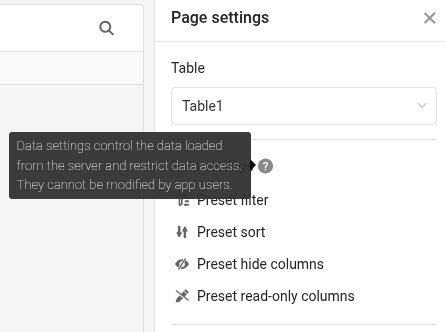
I would go so far to say that we never used this option before, but just the data settings.
For this client-side hiding of columns, the semantics are just not clear: “Hear is a data view for you, and for the curious among you, there are more columns to explore.“?
Therefore, we are absolutely fine to consider this as a good solution. Thanks!
I don’t think that unhiding columns is relevant for most users in the app.
I’d rather say the hide columns options allows users to hide columns that may not be relevant for them. If they want to reduce the number of columns in the frontend (because they don’t need the information for their question/task at hand), they can move them out of sight.
Do it like thousands of other people who have used SeaTable to develop powerful processes and get their ideas and tasks done more efficiently.

 ). After that, I created a
  .
.