Convert 24 hour time to 12 hour time with am or pm in it

attempting to digitize my time sheet at work and it must have am and pm on sheet. How do I convert the time stamp in 24 hour time to 12 hour with am and pm. We are not required to clock in and clock out just keep a record and turn in at end of month. Column names are “Time In”, “Lunch Out”, Lunch In”, and “Time Out”. Have tried a lot of different methods and none of them are converting the time. Any help would be appreciated.

Dennis Wright

Hi Dennis,

I assume that your four columns “Time In”, “Lunch Out”, “Lunch In” and “Time Out” are duration-type columns, are they?
If it’s the case, for each column, you can create a corresponding formula-type column with the following formula:

ifs(floor({Time}/3600)=0,"12",floor({Time}/3600)<13,if(floor({Time}/3600)<10,"0","")&text(floor({Time}/3600)),floor({Time}/3600)>=13,text(floor({Time}/3600)-12)) &":"& if(({Time}/3600-floor({Time}/3600))*60<10,"0","")&text(({Time}/3600-floor({Time}/3600))*60) & ifs(floor({Time}/3600)<12," AM",floor({Time}/3600)>=12," PM")

Where you’ll have to replace every occurrence of {Time} by your actual column name

If your four columns are actual date-type columns accurate to minutes, here is the formula you should use:

ifs(hour({Date})=0,"12",hour({Date})<13,if(hour({Date})<10,"0","")&text(hour({Date})),hour({Date})>=13,text(hour({Date})-12)) &":"& if(minute({Date})<10,"0","")&text(minute({Date})) & ifs(hour({Date})<12," AM",hour({Date})>=12," PM")

Where you’ll have to replace every occurrence of {Date} by your actual column name

Hope this is what you were looking for…

Bests,
Benjamin
It worked. Thanks a bunch.

Dennis

how do i remove the leading zero on the am hours?

Dennis

Also if empty to simply be blank instead of N/A?

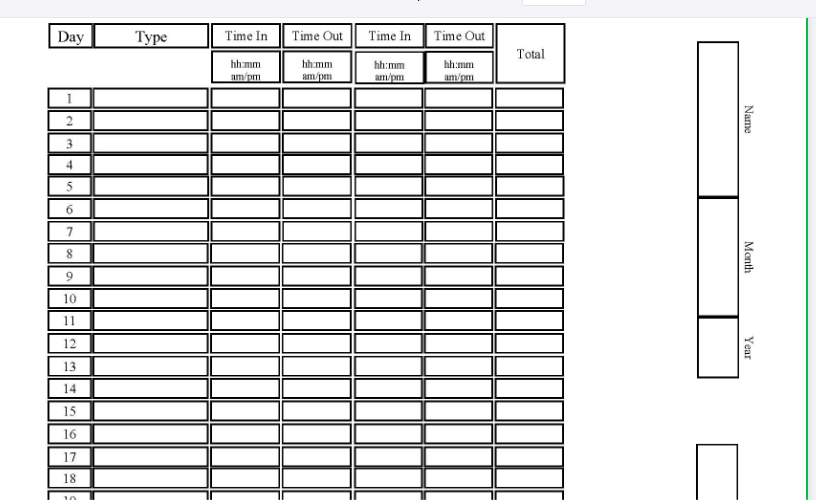
I also have to have a space for weekends. this is what end result will have to look like. On weekends we just leave them blank. I have inserted separate date column but when I delete the date and time on the time in column it delete the row?

Hi Dennis,
You didn’t answer my first question, so I’ll stick on my idea that your columns are duration-type column.

If you have a look at the formula, you might be able to find the if checking if floor({Time})/3600 is less than 10 and adding a “0” and delete it.

Just encapsulate the actual formula with a global if checking for the content of your time column:
if({Time},actual_formula_here,"") (if there’s something in the Time column, use the actual formula, otherwise return an empty string).

Considering the two modifications above, here’s the final version of the formula:

if({Time},ifs(floor({Time}/3600)=0,"12",floor({Time}/3600)<13,text(floor({Time}/3600)),floor({Time}/3600)>=13,text(floor({Time}/3600)-12)) &":"& if(({Time}/3600-floor({Time}/3600))*60<10,"0","")&text(({Time}/3600-floor({Time}/3600))*60) & ifs(floor({Time}/3600)<12," AM",floor({Time}/3600)>=12," PM"),"")

I’m sorry, I really don’t understand what you mean here :thinking:
Considering your template, just create 31 rows in your table (one per day) and leave the weekend days (rows) empty. Then, you can use the Page design plugin to get the output formatted as you want.

Bests,
Benjamin

had a filter in place and didnt realize it. Sorry for ignorant question. the blanking out the empties worked great.

This topic was automatically closed 2 days after the last reply. New replies are no longer allowed.
