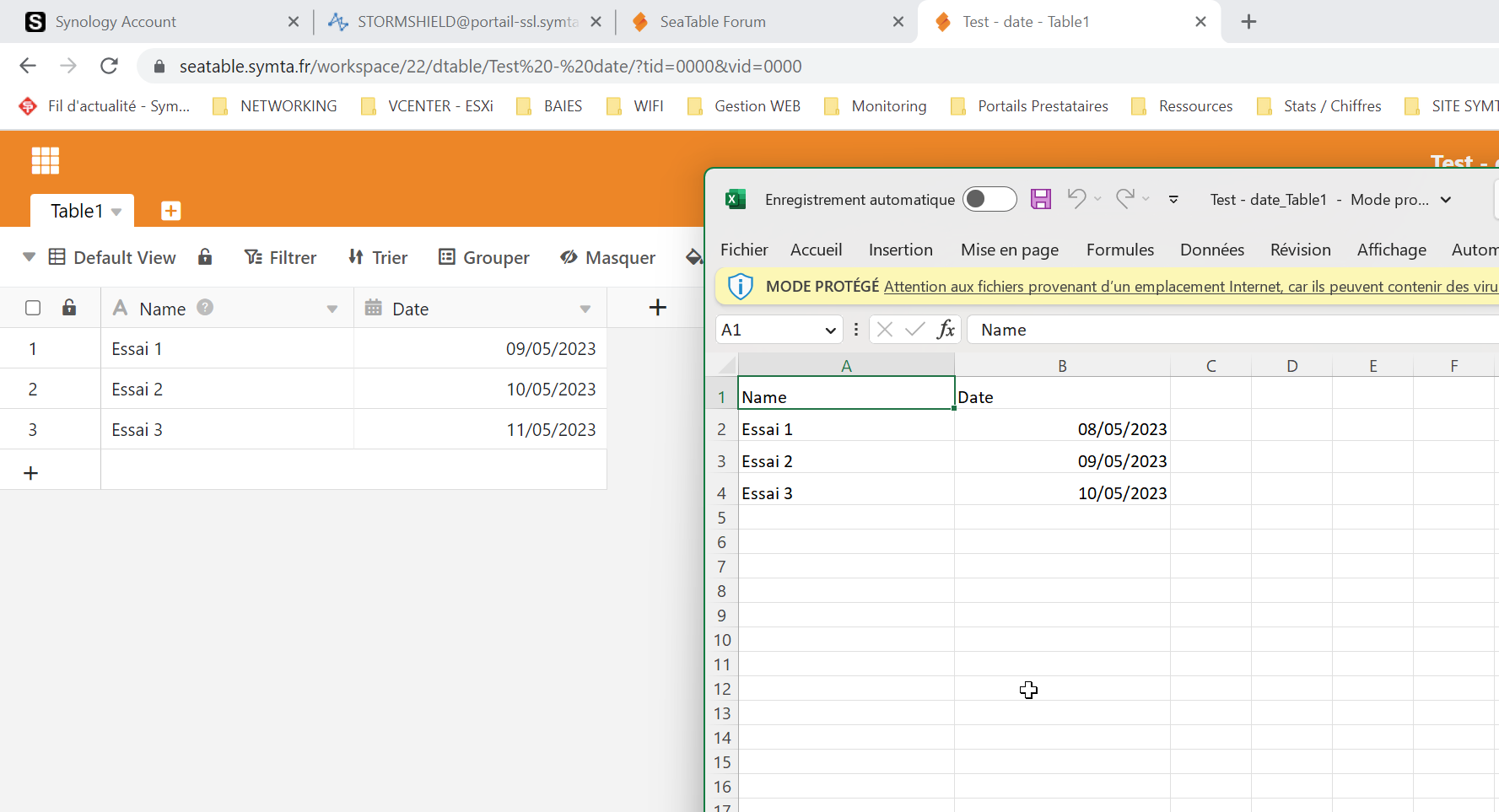
Hello, we notice when we do an excel export of a table, that the date are different.
The date in excel is 1 day older than the date in the table.
Sea the attach file.
It is likely caused by the timezone settings in dtable_web_setting.py. You can change it to match the timezone of your server.
I dont have any timezone settings in this file.
Can you help me to give me the settings to add timezone settings.
Thanks.
here is my dtable_web_settings.py:
root@seatable:/opt/seatable/seatable-data/seatable/conf# nano dtable_web_setting                                                                                                   s.py
  GNU nano 5.4                                                                   dtable_web_settings.py
        'BACKEND': 'django.core.cache.backends.locmem.LocMemCache',
    },
}
COMPRESS_CACHE_BACKEND = 'locmem'

SECRET_KEY = 'xxxxxx'

# for dtable-server
DTABLE_PRIVATE_KEY = 'xxx'
DTABLE_SERVER_URL = 'https://seatable.symta.fr/dtable-server/'
DTABLE_SOCKET_URL = 'https://seatable.symta.fr/'

# for dtable-web
DTABLE_WEB_SERVICE_URL = 'https://seatable.symta.fr/'

# for dtable-db
DTABLE_DB_URL = 'https://seatable.symta.fr/dtable-db/'

# for dtable-storage-server
DTABLE_STORAGE_SERVER_URL = 'http://127.0.0.1:6666/'

NEW_DTABLE_IN_STORAGE_SERVER = True

# for seaf-server
FILE_SERVER_ROOT = 'https://seatable.symta.fr/seafhttp/'

ENABLE_USER_TO_SET_NUMBER_SEPARATOR = True


PLUGINS_REPO_ID='f59784a8-92b4-49b8-bb95-1b38e54b9ee0'


# onlyoffice
ENABLE_ONLYOFFICE = True
ONLYOFFICE_APIJS_URL = "https://SEATABLE_SERVER_HOSTNAME/onlyofficeds/web-apps/apps/api/documents/api.js"
ONLYOFFICE_FILE_EXTENSION = ('doc', 'docx', 'ppt', 'pptx', 'xls', 'xlsx', 'odt', 'fodt', 'odp', 'fodp', 'ods', 'fods', 'csv', 'ppsx', 'pps')
ONLYOFFICE_JWT_SECRET = 'secretjwttoken'


# SAML SSO
ENABLE_SAML = True
SAML_REMOTE_METADATA_URL = 'https://login.microsoftonline.com/xxx>
SAML_PROVIDER_IDENTIFIER = 'azure'
#SAML_CERTS_DIR = '/shared/ssl/'

#SAML_PROVIDER_DOMAIN = 'azure.saml'
# 'Key' is the user attribute of Azure SAML, 'value' is the user attribute of SeaTable. The uid attribute of SeaTable is required.
SAML_ATTRIBUTE_MAP = {
    'uid': 'uid',
    'mail': 'contact_email',
    'name': 'name',
    'employeeid': 'employee_id',   # Syncing user's employee ID from SAML
    'jobtitle': 'user_role',   # Syncing user's role from SAML
}


#Envoi de mail
EMAIL_USE_TLS = False
EMAIL_HOST = '172.16.1.252'        # smpt server
EMAIL_HOST_USER = 'seatable@symta.fr'    # username and domain
EMAIL_HOST_PASSWORD = ''    # password
EMAIL_PORT = 25
DEFAULT_FROM_EMAIL = EMAIL_HOST_USER
SERVER_EMAIL = EMAIL_HOST_USER
You can add
TIME_ZONE = 'UTC'
or
TIME_ZONE = 'Europe/Paris'
to your dtable_web_settings.py.
Thanks for your help 
Your problem solved?
Yes ! The problem is solved. Thanks

Do it like thousands of other people who have used SeaTable to develop powerful processes and get their ideas and tasks done more efficiently.