File Management - Number not matching

We are doing some data cleansing as we noticed we are about half way through our file storage allowance and cant seem to get the maths to work.

According to the Admin page, one of our groups is using ~7 GB of file storage:

image

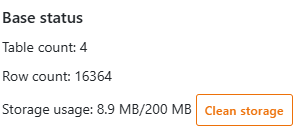
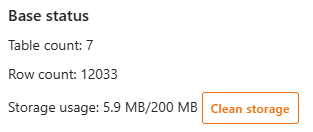
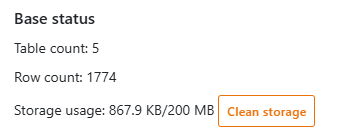
However when we go into the 3 bases, the only place we can find a storage value is under “Base Status” which gives these values:

Which dont not come near to the original figure. Are we just looking in the wrong place? Is there any other way to check the total volume of file storage used per base?

Hey!

Yes, the “Base Status” only displays the size of the actual base data without considering assets.
It is essentially the output of this API call: Get Base Size

There’s the /api/v2.1/dtable-asset/$UUID/asset-size/ API endpoint (which is currently not documented on api.seatable.com) to get the total size of all assets of a single base (accessible through an account token).

However, I don’t think that this is exposed anywhere in the UI :frowning:


One alternative would be to go inside the file management of each base and look for large files: File management in SeaTable: organize and edit files

Is there anyway it could be added to the UI? Its quite useful to know what is using the space at a glance

I agree!
I have added this as a feature request to our internal issue tracking system.

I have documented the existing API endpoint: Get Base Asset Size