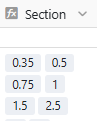
Using Link formula : if values is a set of numbers, the filter does not allow “include”, only “equal”
For example, I have one line :
Then the filter :
will not find this line, and will show only the lines =0.35
Solution : I created an other column with text values of the numbers so the link column “Section” is a table of text, (not of numbers). Is it the only solution ?
Hi @Remi,
Your approach is good, but here is another solution that might fit your needs depending on how you use Section column (or you can recreate another Section column).
I guess your Section column is a link formula/lookup. You may switch to a link formula/rollup/concatenate setting. Using concatenate will make the detected format an array of string, allowing you to use the string-based filters on this column (such as “contains”).
Currently only the first element in link formula is used for filters.
This is because in many use cases, link formula return only one element, and people want to use this element for filters, and treat the result of link formula as a single value instead of an array.
Currently, for simplicity, only native array column types, like collaborators, multi-select, link columns are treated as array. Other column types are treated as a single value column.
Do it like thousands of other people who have used SeaTable to develop powerful processes and get their ideas and tasks done more efficiently.