Environment: Debian + Docker
Version: seatable-developer 6.0 and seatable-ai:latest, both running on the same host.
My .env file includes seatable-ai.yml , with the model provider set to “other”. I’ve enabled AI and configured the URL as follows:
COMPOSE_FILE='docker-compose.yml,seatable-ai.yml'
COMPOSE_PATH_SEPARATOR=','
……
# LLM
SEATABLE_AI_LLM_TYPE='other'
SEATABLE_AI_LLM_URL='https://api.XXXXXX.XXX/v1'       # /chat/completions
SEATABLE_AI_LLM_KEY='sk-BXXXXXXXXXXXXXXXXXXXXXXXXXXXXXXXXXXXXX3'
SEATABLE_AI_LLM_MODEL='gemini-3-pro-preview'

ENABLE_SEATABLE_AI=true
SEATABLE_AI_SERVER_URL='http://seatable-ai:8888'
……
I checked the Docker logs for both seatable and seatable-ai containers, and they appear to be running normally:
root@debian:~# docker logs e417b8828390
root          13       1  0 16:54 ?        00:00:00 /bin/bash /scripts/seatable-ai.sh
root          17      13 99 16:54 ?        00:00:01 python3 main.py --pidfile /opt/seatable/pids/seatable-ai.pid
root          25      13  0 16:54 ?        00:00:00 grep seatable-ai
seatable-ai started

This is a idle script (infinite loop) to keep container running.
root@debian:~# docker logs 2426f88cee75
*** Running /etc/my_init.d/01_init.sh...
*** Booting runit daemon...
*** Runit started as PID 26
*** Running /templates/enterpoint.sh...
2025-11-25 17:35:38 Start init
2025-11-25 17:35:46 Nginx ready
2025-11-25 17:35:46 Updating CA certificates...
2025-11-25 17:35:52 Start server
SeaTable started
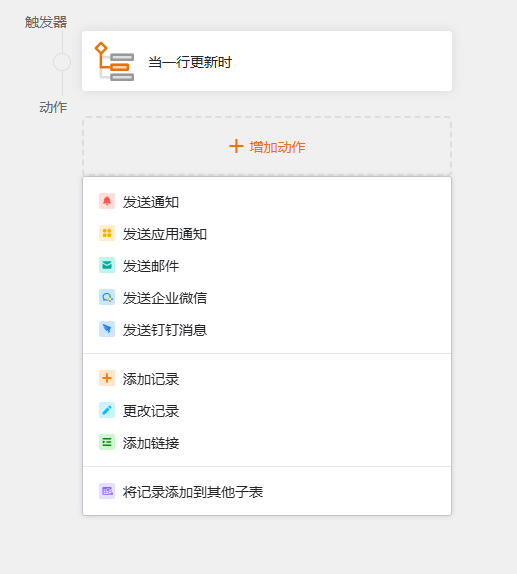
However, in SeaTable’s automation rules, there are no AI actions available to select.
Could anyone help me figure out what the problem might be? Thank you!
