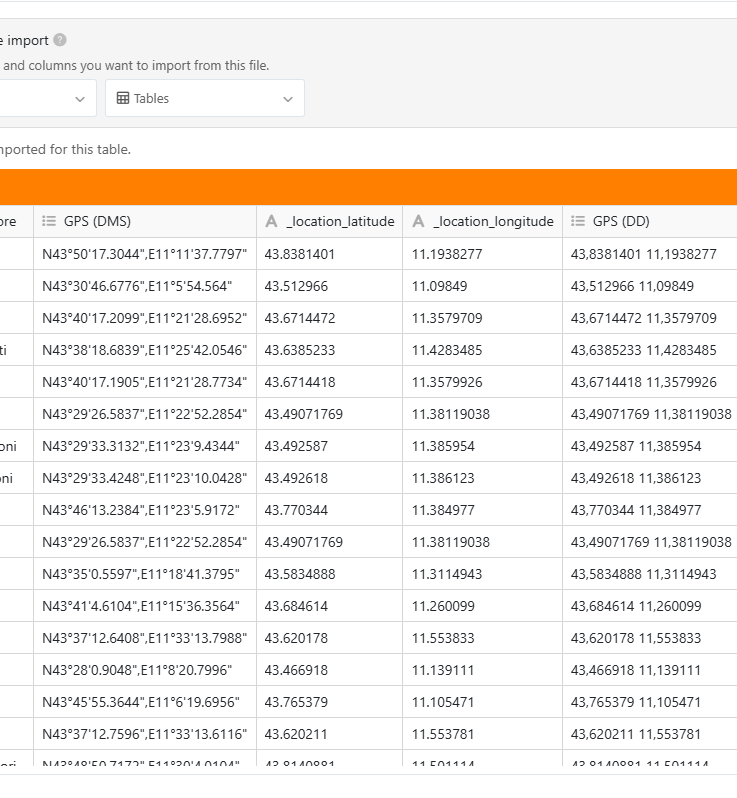
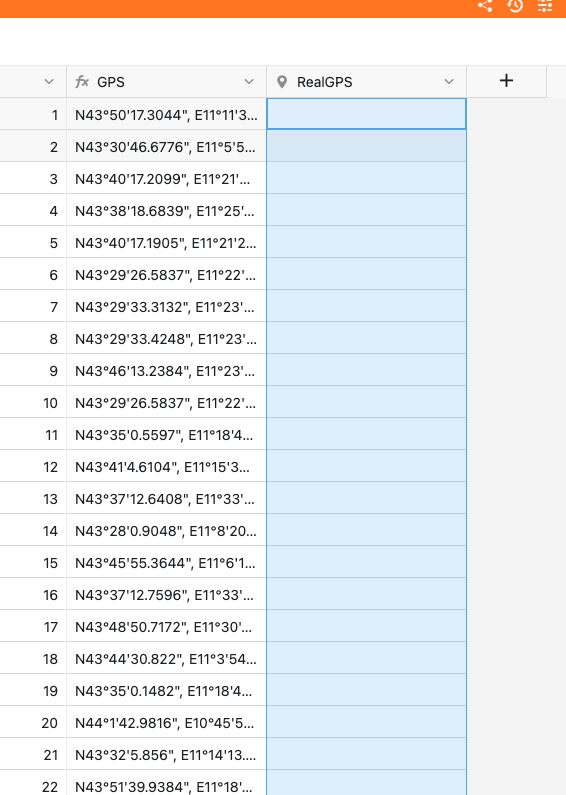
I agree, importing a geolocation column is awkward.
This is how you can do it:
Import the file without doing anything special → you’ll end up with geodata in a multiple select column
Add a formula column and add the function {<column_name>} where <column_name> is the name of the column storing the GPS data. → the column shows the values a comma-separated text
Add a geolocation column
Copy and past the content from the formula column to the new geolocation column
Hope this works for you. We’ll improve the import in the future.
Sorry for this late reply, I hope it could help you anyway… Here is a little Python script that might do the job for the last step. Actually, the Geolocation column is expecting an object containing both lat and lng key with DD coordinates value. You will have to modify the TABLE_NAME, TXT_COORDS_COL and GEOLOCATION_COL at the beginning of the script to match your needs (probably only the table name as I used the columns’ names from your screenshot).
import re
from seatable_api import Base, context

TABLE_NAME = 'Table1'
TXT_COORDS_COL = 'GPS'
GEOLOCATION_COL = 'RealGPS'

def dms_to_dd(dms_str: str) -> float:
    dms_str = dms_str.strip().upper()
    direction_match = re.search(r'[NSEW]', dms_str)
    if not direction_match:
        raise ValueError("Missing N, S, E or W direction.")
    direction = direction_match.group()
    dms_str = dms_str.replace(direction, '').strip()
    pattern = r"""
        (?P<degrees>-?\d+(?:\.\d+)?)\s*°?\s*
        (?P<minutes>\d+(?:\.\d+)?)?\s*[\'′]?\s*
        (?P<seconds>\d+(?:\.\d+)?)?\s*["″]?
    """
    match = re.search(pattern, dms_str, re.VERBOSE)
    if not match:
        raise ValueError("Format DMS invalide.")
    degrees = float(match.group('degrees'))
    minutes = float(match.group('minutes')) if match.group('minutes') else 0.0
    seconds = float(match.group('seconds')) if match.group('seconds') else 0.0

    dd = degrees + minutes / 60 + seconds / 3600
    if direction in ('S', 'W'):
        dd = -abs(dd)
    else:
        dd = abs(dd)
    return dd

base = Base(context.api_token,context.server_url)
base.auth()
rows = base.list_rows(TABLE_NAME)
rows_data = []
for row in rows:
  lat = dms_to_dd(row[TXT_COORDS_COL].split(',')[0])
  lng = dms_to_dd(row[TXT_COORDS_COL].split(',')[1])
  print(str({'lng': lng, 'lat': lat}))
  if lat and lng:
    rows_data.append({
      "row_id" : row['_id'],
      "row" : {
        GEOLOCATION_COL : {'lng': lng, 'lat': lat}
      }
    })

base.batch_update_rows(context.current_table,rows_data)
with your tiny Py the problem is fixed … I really appreciate it
but now i have another issue while display with MAP add-in…very very strange: using a view two gps point are not in the correct position despite the GPS coordinate are exactly calculate !?!? the same point with global view (without any filter) are in the correct position
Hi again @EmaTeo,
One word is probably missing in your last message: are you saying that in a filtered view, some of the points are not in the correct position (but not every points)? If that’s the case, that’s definitely really weird?!
Even if you can’t share your example, can you at least tell us more about your use case: which column (what column type) is the filtered you use applied on, etc.?
thx for your response. Actually with last new creation of a different table with the same coloumns the issue is not present..very weird … that’s ok so for.
bests,
Emanuele
Do it like thousands of other people who have used SeaTable to develop powerful processes and get their ideas and tasks done more efficiently.