I’m a newbie to Seatable, and I am evaluating it for potential implementation in my job environment, however I gut stuck installing the on-premise enterprise docker version. Installation is fine, and I can create a base, but as soon as I open it I get the message
Hi Simon,
welcome to the SeaTable Forum!
You’ll need to give us a little more info for efficient debugging. How did you set up your system? HTTP or HTTPS - with Let’s Encrypt or your own SSL certificates?
Please make sure that the paths are correct in ccnet.conf and dtable_web_settings.py. (If you use http, the paths must begin with http://; if you use https, the paths must begin with https://)
You can also post your Compose file and your conf files here (after removing your passwords). Then we can have a look.
This is quite a typical problem if you use a custom domain other than “localhost”.
SeaTable stores the bases in the “dtable-server”, while the interface you see is the “dtable-web”. When you can see the interface, it means the dtable-web is fine, that the bases cannot be loaded is due to the fact that dtable-server cannot be accessed.
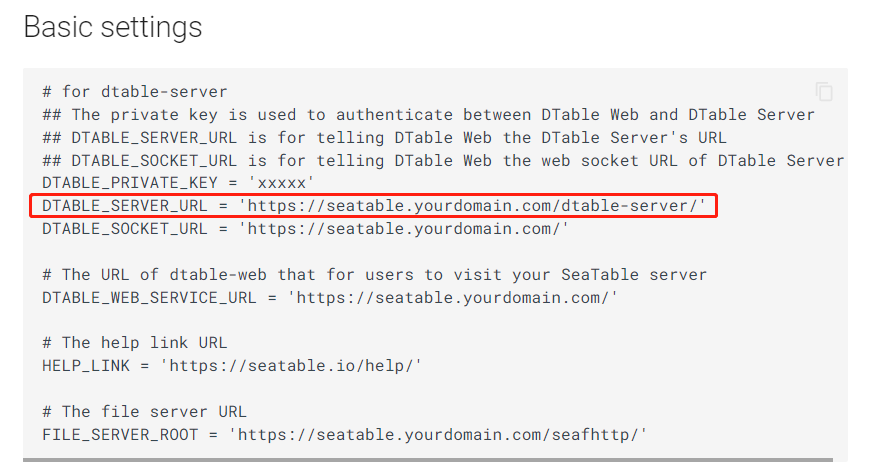
You need to change the domain name also for the dtable-server in the dtable_web_settings.py:
Could you post the output of the browser console? This might shed a little more light on the root cause of the problem.
One more thing: Which version do you use? Please try with a 2.6 version. (We upgraded to Django 3.2 in version 2.7 and we had to realize that this caused unintended problem in http-only setups.)
I would also be fine with using https, of course. Unfortunately using the standard setup for https I was unable to access both http and https (“Connection closed by host”), so I decided to start with the more simple http and care about https later.
sorry for the silence. Finally I found out what the problem was!
Stupid and simple: Our server is hosted in an OpenStack environment behind a firewall. I just had to add 127.0.0.1 to the “noProxy” value in ~/.docker/config.json.