Hello community,
It’s not clear which API/GET I can use to get the remaining number of rows or get the remaining available size of the database for my cloud account ?
Thanks for your help,
Example of a code block for error messages
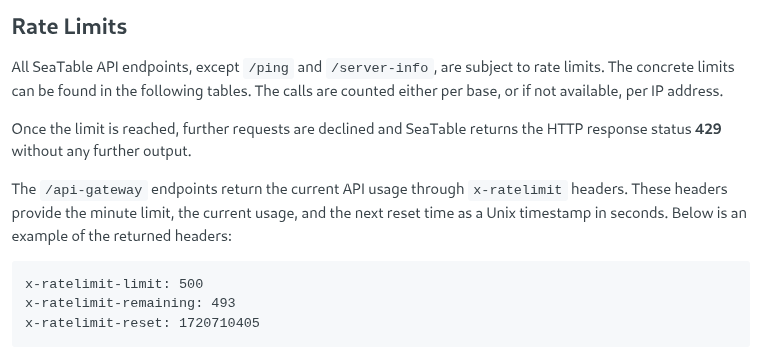
They are in the headers of the http responses that are returned by the api.
There’s no explicit api call to get to this information, it is returned in the response headers of every api call.
I don’t think for example the javascript api exposes this information.
Can’t see what I’m looking for after a https://{{ $json.server }}/api-gateway/api/v2/dtables/{{ $json.base_uuid }}/tables Call
I have no traces of limits or remaining records in the header, …
The linked article contains one part of the answer to your qustion:
The second part is in this forum post: Get x-ratelimit-limit, x-ratelimit-remaining und x-ratelimit-reset from JavaScript-Client
This is what I get in the header, … no trace of xrate-limit
[
  {
    "_id": "HkRH",
    "name": "contacts",
    "is_header_locked": false,
    "header_settings": {},
    "summary_configs": {},
    "columns": [
      {
        "key": "0000",
        "type": "text",
        "name": "Name",
        "editable": true,
        "width": 200,
        "resizable": true,
        "draggable": true,
        "data": null,
        "permission_type": "",
        "permitted_users": [],
        "permitted_group": [],
        "edit_metadata_permission_type": "",
        "edit_metadata_permitted_users": [],
        "edit_metadata_permitted_group": [],
        "description": null,
        "colorbys": {}
      }
    ],
    "rows": [],
    "view_structure": {
      "folders": [],
      "view_ids": [
        "0000"
      ]
    },
    "views": [
      {
        "_id": "0000",
        "name": "Default View",
        "type": "table",
        "private_for": null,
        "is_locked": false,
        "row_height": "default",
        "filter_conjunction": "And",
        "filters": [],
        "sorts": [],
        "groupbys": [],
        "hidden_columns": [],
        "colorbys": {},
        "rows": [],
        "formula_rows": {},
        "groups": [],
        "summaries": {},
        "colors": {},
        "column_colors": {}
      }
    ],
    "id_row_map": {}
  }
]
That is the body of the response, not the headers.
Which programming language are you using?
Unless the api for your language exposes the headers in some form, you have to do the http get/post/etc. yourself to get to the headers.
curl -I (with a capital i) might be your friend.
Also I think I misunderstood your question.
In the headers you will find info on how many api calls are left before you are rate limited.
If your question is how many rows you can still create before hitting the limit of your subscription, that would be a total different thing.
I haven’t seen any documentation on that.
@hsteph Is your issue solved?
I still need to test curl -I, … but I get the idea, … it should work
You can close the ticket.
Thanks

Do it like thousands of other people who have used SeaTable to develop powerful processes and get their ideas and tasks done more efficiently.