Your Setup:
- SeaTable Self-hosted 5.1.9
Describe the Problem/Error/Question:
Before I raise this as a bug, I’d like to fully understand how this is supposed to work, and whether my expected behaviour is not how the system is designed. I thought I raised a similar question before, but coudn’t find it any more.
This is strictly Seatable backend, no Universal App involved (yet). We have quite a complex base, with linked tables and columns too numerous to mention. The main table, for example, has grown to over 100 columns.
My first question/issue: We have configured a linked column, restricted to a view, only a single link, linking existing records and creating new ones both possible in the link dialogue.
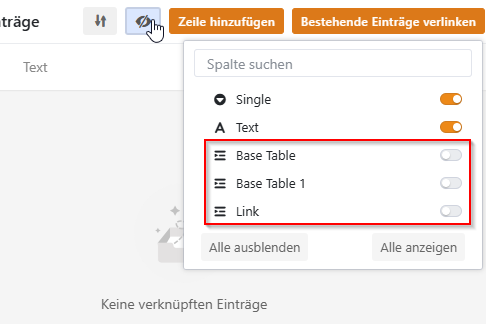
We expected that the columns / fields available in the “link record / add new” dialogue would reflect the "hidden columns " setting in the view that we configured. In pictures:
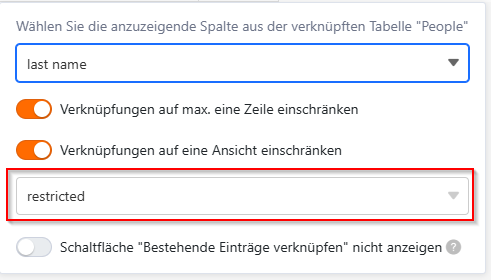
Hidden column in view “restricted”

We expected to not have the “type” column available when adding a new record from the link dialogue, but here it is:
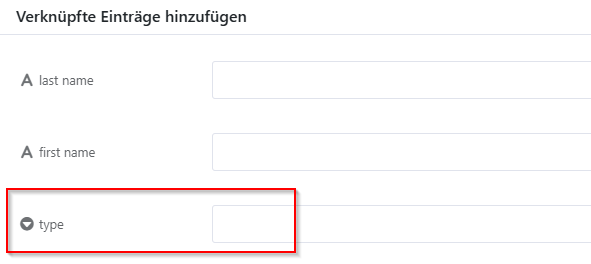
So is our assumption wrong that “hidden columns” does anything to the “add record” form? What’s more, is there any way to influence the “add record from linked column” form? I noted when displaying a linked recording, the “hidden columns” setting from the target table/view is actually regarded.
This first question was just from a test database to figure out the general behaviour.
Second question comes from our production database. The link target table has 14 columns, 7 of which are link columns. That target table contains a central list of “people”, so they are backlinked to 7 other tables.
That’s where the problem starts: When I link to that person table, allowing a new record to be added, the form to add the record looks like this:
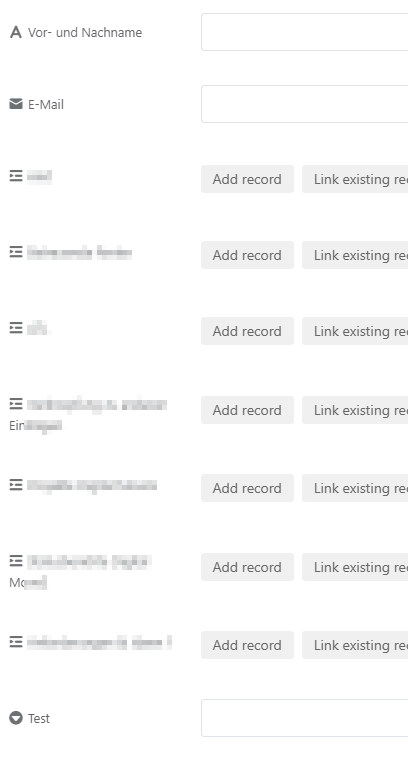
There seems to be no system in the way the fields / columns are (not) displayed. Some fields (single select, multi select, texts) are missing no matter what, of the 8 link columns, only 7 are displayed … we’re still trying to figure out what’s happening.
But getting an answer to the first question about the designed behaviour would help.
Thanks!