Hi everyone, I am new to seatable and is trying to get my head around this app. I am trying to set up a database on supplier, recipe, ingredients, and costing, but I am facing an issue.
SeaTable Scripting & Costing Issue Summary
Problem Overview
I’m experiencing persistent issues with SeaTable scripting and cost calculation propagation through linked tables, specifically with WIP (Work-in-Progress) ingredients showing zero costs in final recipe calculations.
Core Issue
WIP Costing Propagation Failure
Symptoms:
WIP ingredients calculate costs correctly in WIP Recipes table
Costs show correctly in Ingredients table
Costs show correctly in Recipe Ingredients table
But costs become zero in Recipe List rollup columns
Manual entry works, but formulas don’t propagate through links
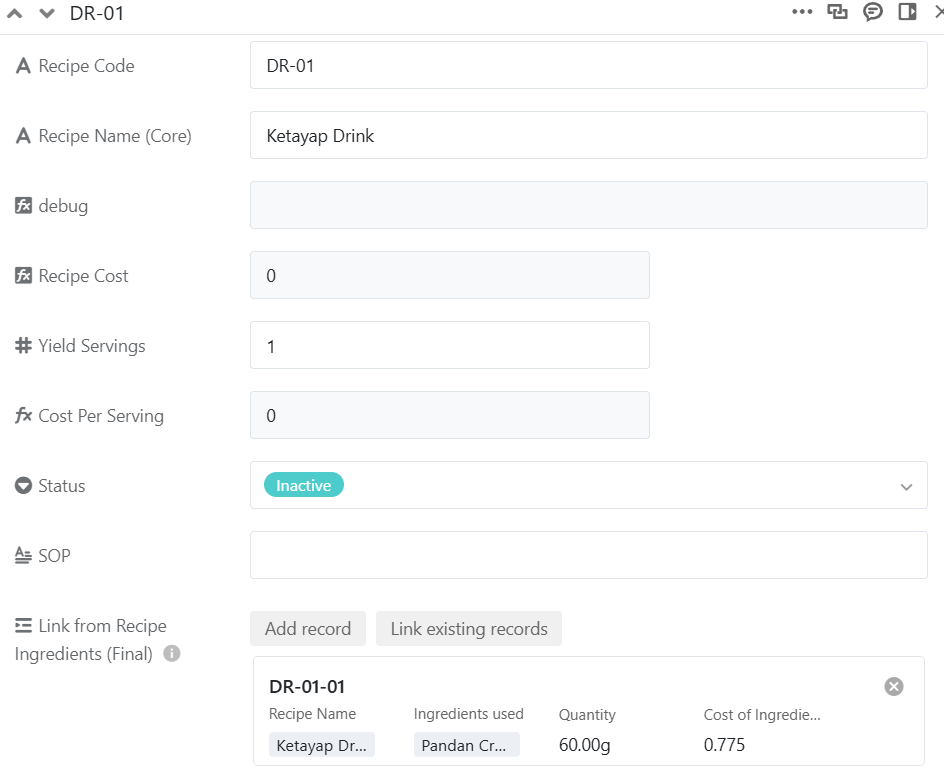
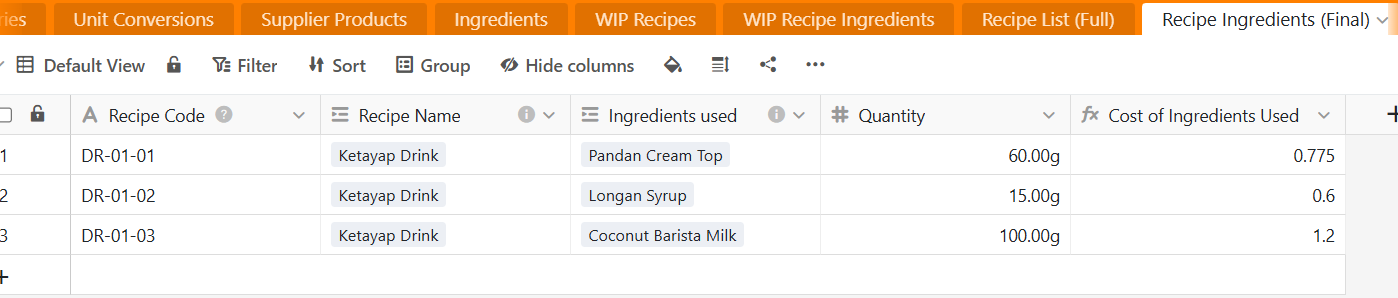
DR-01-01 cost is 0.775, and it should be pulled from Recipe Ingredients (Final) table to Recipe List table, but the cost here shows 0. Status does not affect any of the formula here so we can ignore that.
Multiple Python scripts (all fail with base not defined)
JavaScript scripts (same error)
Different script structures and table names
Testing in separate bases
Formula Workarounds:
Direct column references
Helper columns
Manual cost columns
Different rollup configurations
Structural Changes:
Separate WIP Recipes table
Clear linking relationships
Minimal test cases with 2-3 ingredients - If at any part of the linkage, the data in the linkage is typed as Number format manually, everything works as intended. However this defeats the purpose to use SeaTable.
Questions for SeaTable Community
Scripting Issue:
Why is base object not available in my script environment?
Is this a plan limitation or platform bug?
How can I debug the scripting environment?
Costing Issue:
Is there a known limitation on formula propagation depth?
Why do WIP costs disappear in rollup columns but show in direct links?
Best practices for circular cost calculations (WIP items that contain other WIP items)?
Workarounds:
Alternative approaches for hierarchical costing?
Ways to break circular references while maintaining cost accuracy?
Script-free solutions for cost propagation?
Environment
Plan: SeaTable Free Plan
Use Case: Restaurant recipe costing with ingredient hierarchies
Data Scale: 100+ recipes, complex WIP ingredient trees
This issue is blocking my entire recipe costing system. Any help debugging the scripting environment or suggesting alternative architectures would be greatly appreciated!
First of all, thank you for your effort to present your case as clearly as possible, I really appreciate that! However, I’m afraid I quite didn’t understand the whole process as I wasn’t able to reproduce your problem . In my case, I don’t get 0 but a #DIV/0! error in the Recipe Cost field of the Recipe List table.
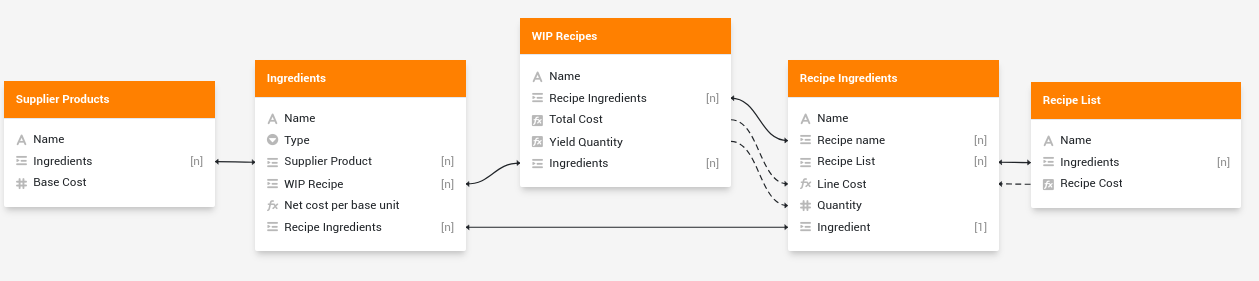
Here is the global base structure I set up based on your description:
Please note that this screenshot comes from the table relationships plugin, and I’d really like to have the same from your base.
Here is why I get this error, which is something that doesn’t seem to work in your process:
In Ingredients table, for WIP ingredients, Net cost per base unit is calculated from {WIP Recipe.Total cost}
In WIP Recipes table, Total cost is computed (rollup/SUM) from Line cost in Recipe ingredients table
In Recipe ingredients table, Line cost is related to {Ingredient.Net cost per base unit}
=> There is no “entry point”
Scripting
About scripting, please have a look at the recently reworked scripting documentation in SeaTable’s developer documentation. You’ll find both simple examples and exhaustive reference for each function. Here is a very short Getting started however:
JavaScript: base should be defined. Do you get the error trying a simple code such as this one?
Python: you need to import the seatable_api module and to authenticate to your base in order to be able to interact with the base. The equivalent to the above JavaScript script will be:
from seatable_api import Base, context

base = Base(context.api_token,context.server_url)
base.auth()

tables = base.list_tables()
print(len(tables))
Base structure
I struggle understand your base structure. As far as I understand it (and as I already said, I probably missed something!), here is the main process:
For “final” recipes, you calculate the recipe cost from the sum of single ingredient cost multiplied by its quantity
For WIP recipes, I don’t really understand how you want to the calculation to be processed: you have the global recipe cost, each ingredient’s quantity and you want to calculate each ingredient cost right? If it’s the case, your Total Cost in WIP Recipes table should be manually defined and not computed (rollup/SUM) from ingredients. However, you won’t be able to calculate properly each ingredient cost if you have several ingredients: you have one single equation that looks like global cost = ingredient1.cost * ingredient1.quantity + ingredient2.cost * ingredient2.quantity + … but you’re trying to find out several variables (ingredient1.cost, ingredient2.cost, …) which is not possible.
Please clarify the process for WIP recipes (what/how are you trying to calculate?) and share with us a screenshot from the table relationships plugin, it may help to better understand your problem.
Hi @bha, first of all, thank you very much for your reply and effort to test my problem out. Really sorry that I missed out on the reply notification until now.
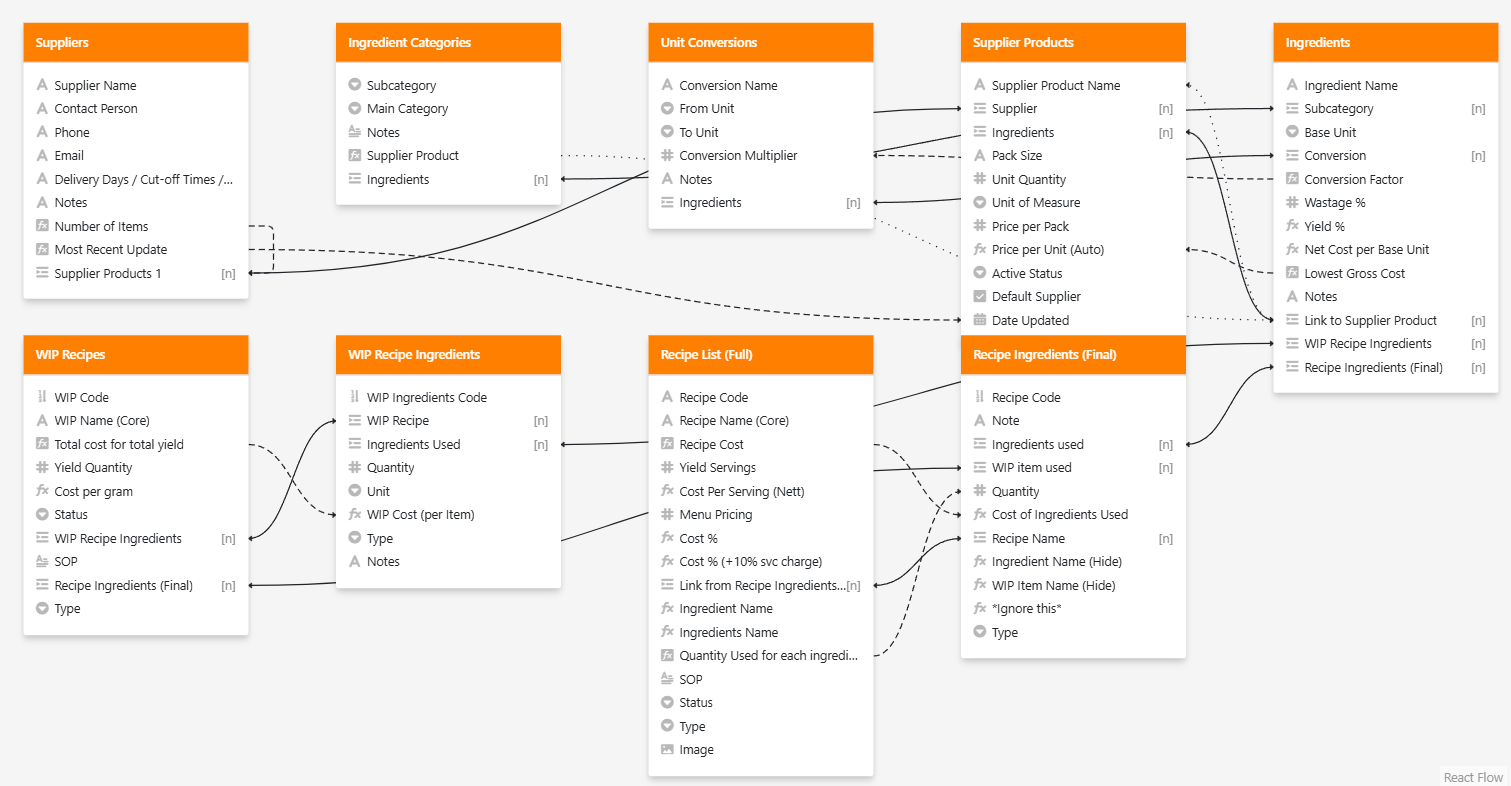
I currently fixed the issue with another workaround. Here is my current linkages.
I suspect that SeaTable have limitations to how many times 1 cell/column can be linked around. At this point everything is working fine, but If I create another table to calculate, lets say, Cost for takeaway items, linking from Recipe List (Full), some of the values that went through from Supplier products → Ingredients → WIP ingredients → WIP Recipe → Recipe Ingredients → Recipe list won’t make it to the new table “Cost for takeaway items”.
This is the same issue as previously when I tried to link some items from Supplier products → Ingredients → WIP ingredients → WIP Recipe → Recipe Ingredients → Recipe list → Costing & Margins, it shows value as 0 at Costing & Margins table, thus I combined the cost calculation in Recipe List and use different views to manage them.

 . In my case, I don’t get 0 but a