Neue Aktion: Bestehenden Eintrag in anderer Tabelle bearbeiten

Your Setup:

  • SeaTable Enterprise self-hosted 6.0.10

Describe the Problem/Error/Question:

Für die Automatisierungsregeln wäre die Aktion “Bestehenden Eintrag in anderer Tabelle bearbeiten” sehr hilfreich. Ist die Umsetzung einer solchen Aktion bereits in Planung?

1 Like

Das geht aktuell mit einem Skript.

Was ist denn die genaue Anforderung: einen verlinkten Eintrag zu bearbeiten oder irgendeinen Eintrag zu bearbeiten?

Danke für den Hinweis zum Skript. Die Herausforderung mit Skripten ist für mich, dass ich diese selbst nicht erstellen kann und hierfür immer die Hilfestellung eines Kollegen benötige. So kam der Wunsch nach einer standardisierten Funktion auf.

Hintergrund der Anforderung: Ich habe in meiner Base über 20 Tabellen. Die Anpassung von Datensätzen in der einen Tabelle hat oft Auswirkungen auf die Einträge in einer oder mehreren anderen Tabellen. Beispiel: Projekt A erhält in Tabelle 1 den Status “Go”, was per Automatisierungsregel zu einer Anpassung bestimmter Werte in Tabelle 2 und Tabelle 5 führen soll.

1 Like

Hallo @ppm,
ich sehe dass Sie die “self-hosted” Version verwenden. Falls Sie die Installation selbst verwalten können, könnte n8n Ihre Anforderungen an eine No-Code-Lösung erfüllen. Im Administratorhandbuch finden Sie Informationen zur Konfiguration Ihrer Installation für die Integration von n8n.

Benjamin

Danke für die Präzisierung.

Folgende Nachfrage und ich erlaube mir beim Beispiel zu bleiben: Sind die Einträge in Tabelle 2 und Tabelle 5 mit dem Projekt in Tabelle A über eine Verknüpfungsspalte verknüpft? Wenn ja, dann könnte man über Erweiterung der Automatisierungsregeln nachdenken. Wenn nein, dann sehe ich da Hürden. Man müsste in der Automatisierungsregel Suchregeln definieren, um die Einträge in Tabelle 2 und 5 zu identifizieren. Das könnte bei einer unpräzisen Definition der Suchregeln auch zu einer sehr großen Anzahl an Änderungen führen.

Ein Verknüpfung zum Projekt ist in den anderen Tabellen gegeben.

Danke dafür! Das ist eine interessante funktionale Erweiterung.

Sorry I’ll reply in English for this one. This is actually a great improvement idea!
In the meantime, if this can help you, here is a python script I tried to made as generic as possible. Here is it’s behaviour:

  • In each target table (in your example Tabelle 2 and Tabelle 5) linked to your source table (in your example Tabelle 1) that you want to update when a record from the source table is updated, you create a checkbox column. All these columns will have the same name, and you have to enter this name on line 5 of the script (in my example, the name of these columns is toUpdate)
  • In the automation triggered by an updated record in Tabelle 1, you’ll add the action Run python script with the following script
  • For each link-type column of Tabelle 1, the script will look for the checkbox trigger column in the target table. If this column exists and that there are actual records from a target table linked to the record from Tabelle 1 that triggered the automation, the script will update these linked records by checking the checkbox trigger column
  • Then, for each target table, you can create a separate automation triggered by an update of the checkbox trigger column value (don’t forget, at the end of this automation, to uncheck back the checkbox trigger column!)
from seatable_api import Base, context

# Type bellow the name of the checkbox-type column you will create in every linked (target) table
# that you want to be able to update when a record from the (source) table is updated
CHECKBOX_TRIGGER_COLUMN_NAME = "toUpdate"

base = Base(context.api_token, context.server_url )
base.auth()
rows_data = []
tables = base.list_tables()
current_table_id = [t['_id'] for t in tables if t['name'] == context.current_table]
if current_table_id and len(current_table_id) == 1:
  current_table_id = current_table_id[0]
  link_columns = [c for c in base.list_columns(context.current_table) if c['type'] == "link" ]
  print(f'Link columns found in the table "{context.current_table}": {', '.join([c['name'] for c in link_columns])}')
  for col in link_columns:
    other_table_reference = 'other_table_id' if current_table_id == col['data']['table_id'] else 'table_id'
    table = [t for t in tables if t['_id'] == col['data'][other_table_reference]]
    if table and len(table) == 1:
      table = table[0]
      print('==========================')
      print(f'Column "{col['name']}" (linked to table "{table['name']}")')
      if base.get_column_by_name(table['name'], CHECKBOX_TRIGGER_COLUMN_NAME):
        print(f'  Table "{table['name']}" contains a "{CHECKBOX_TRIGGER_COLUMN_NAME}" checkbox trigger column')
        #print(f'  > Checking the "{CHECKBOX_TRIGGER_COLUMN_NAME}" checkbox for linked records from column "{col['name']}"')
        data = []
        record_names = []
        if col['name'] in context.current_row:
          for record in context.current_row[col['name']] :
            data.append({"row_id" : record['row_id'],"row" : {CHECKBOX_TRIGGER_COLUMN_NAME: True}})
            if record['display_value']:
              record_names.append(record['display_value'])
            else:
              record_names.append(f'(empty display value, _id={record['row_id']})')
          if data:
            rows_data.append({'table':table['name'],'rows_data':data})
            print(f'  Records to update (checking the "{CHECKBOX_TRIGGER_COLUMN_NAME}" checkbox): {', '.join(record_names)}')
        else:
          print(f'  No record from table "{table['name']}" linked in column "{col['name']}"')
      else:
        print(f'  No "{CHECKBOX_TRIGGER_COLUMN_NAME}" checkbox trigger column found in table {table['name']}')
        print(f'  > No update for linked records from column "{col['name']}"')
  print('==========================')
  for t in rows_data :
    print(f'Updating records from table "{t['table']}": {base.batch_update_rows(t['table'],t['rows_data'])}')
  print('==========================')
  print("Script terminated")

I hope this might help!

Bests,
Benjamin

1 Like

@bha @rdb rely on @ppm to push the system to its limits :smiling_face:

Let me give you a bit more of a background - this suggestion also affects the strategic placement of Seatable in our organisation as an NO-code database, vs. LOW-code tools we also have in place.

In short, @ppm ‘s suggestion gets my whole-hearted support. Not because it would enable Seatable to do something it can’t do at the moment (albeit with scripts or n8n), but because it enables HER to do something on her own, without my or any other person’s technical support. This seems to make even more sense when an extension like “change linked record(s)“ (it would probably affect all linked records, i guess) seems so close to something we already have in automations.

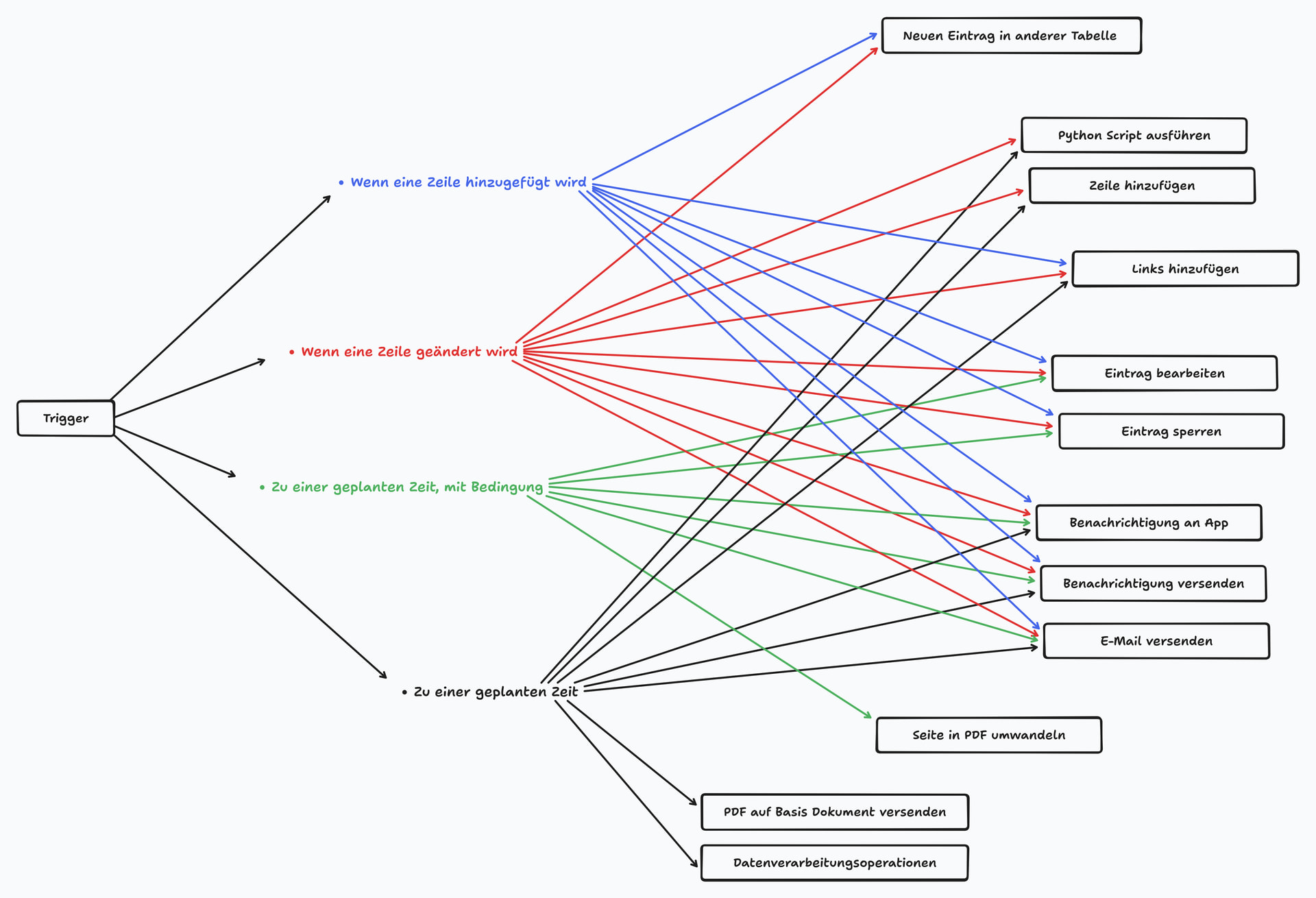
Another example in the same direction to illustrate the direction I’m going: The other day, I had to fill the gap that is left by the fact that the “add links” and “add line“ cannot be triggered by the “trigger at a specific time with condition

Still, I kept the resulting python script extremely short and universal. Just created a time-triggered pseudo-change in a view, where @ppm then could set filters to emulate the trigger condition. BTW: That’s where I found This bug

Anyway - the main point of both examples: @ppm is limited mostly to Seatable’s GUI, and even when I script and n8n something, I make a point of putting her back in control (in the GUI) as soon as I can.

Background’s background: I just finished a 25+ page internal paper, where I justify the need for a no-code database into our organisation. One main point is the matter of ownership and responsibility:

  • As a very knowledable no-code base creator, @ppm can take full ownership and responsibility of her processes in Seatable, because she understands every bit of it - but only as long as it’s done in the GUI. The same applies to other users.
    • At some point, I’d even like to be able to say: “If someone can’t do something in Seatable’s GUI, they probably shouldn’t be doing it“
    • That’s for the average user - tech-savvy users can do whatever they want.
  • Everything that’s scripted or done with n8n falls into my responsibility, and in addition makes processes less stable and flexible.

So Seatable’s core strength, in my opinion, and what sets it apart from other systems, is the fact that it gives people like @ppm full control over the implemention of their processes.

The whole reason for this lengthy background: I hope it’s OK for you if we keep suggesting functions that might be done with scripts and n8n as well, but would enable a lot more GUI-only users to fully own their bases, data and processes when implemented in the GUI.

2 Likes