I have set up a new fresh single-node install of Seatable Enterprise 4.4.9, and after the initial docker-compose up (everything worked fine) I added the python pipeline (using python-scheduler:3.1.0 and python-starter:3.1.1). However when I try to run a simple python command like 'print("hello) ', I get the error “error: Error: <!-- IE friendly error message walkround.”
The setup does not use caddy but a separate dedicated nginx reverse proxy. The whole server is behind a coporate proxy server.
Any idea how to debug? I have been struggling with this for many, many hours…
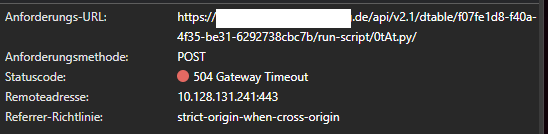
To add some info: Running any python script from the web interface I get an 504 error:
Where in the logs can I see which call in the seatable-server docker container ended in the Gateway timeout? I assume it is triggered by dtable-web, or? To me it looks like the problem might be connected to the proxy environment (proxy, not the reverse proxy!), but I cannot find the url that is causative.
Sorry for my late reply. Finally, I could solve the problem by removing caddy from the docker-compose file and replacing it with a classical nginx reverse proxy configuration. Obviously the caddy configuration did not fit to our (a little complicated) local network infrastructure which uses a proxy server for all outgoing traffic. Maybe it’s also possible with some tweaks in caddy, but since nginx is working fine, I stopped the analysis at this point.
Thanks!
Simon
Do it like thousands of other people who have used SeaTable to develop powerful processes and get their ideas and tasks done more efficiently.