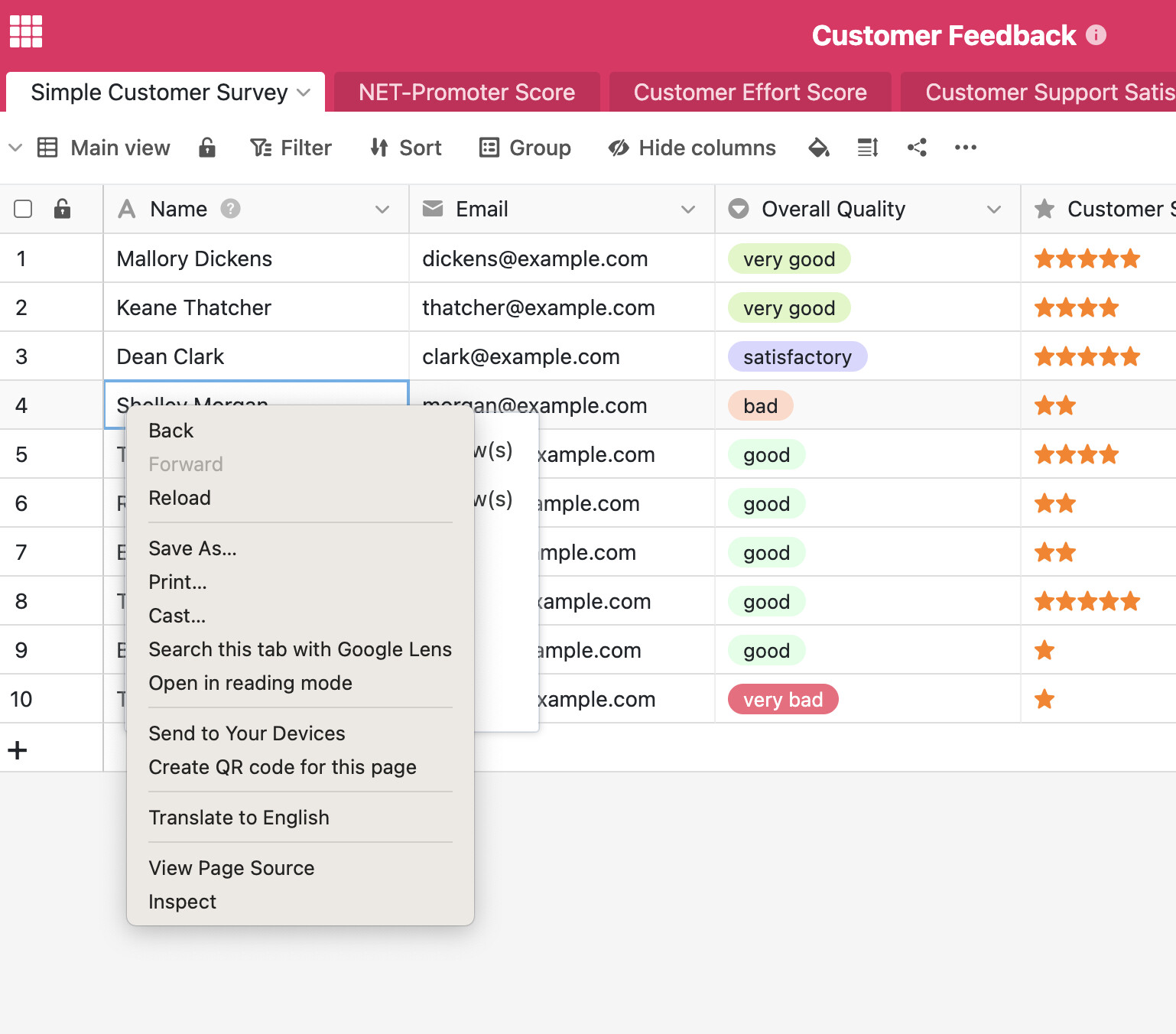
I am using Seabase UI to create Base , Tables and added some rows. But when i tried to manually delete a row , i can not see the popup menu when i right click on the row number, as shown in the instructions. Instead of SeaTable menu, a standard Chrome browser (or Vivaldi browser) menu popsup on right click.
After several tries, by clicking here and there, i have noticed that the Seatbale’s delete menu pops up. but not accessable, because it is behind Chroms menu. see the screen shot below.
is there any workaround or will it be fixed in 6.2 version?
Hi Daniel, thanks for sharing. As you can see from the screenshot , there is no any extra unusual pop ups or screens. Just regular “right click“ menu of the browser. Same behaviour for Chrom and for Vivaldi browsers.
i have disabled all plugins , still the same result.
on Vivaldi browser there are no any plugins, and the same issue it there.
please note, that as on the screenshot above, both right click menus are appearing (system one and seatable one). So i dont think the issue is any plugin.
i use this Crome: Version 147.0.7727.56 (Official Build) (x86_64)
MacBook Pro 13inch 2020. MacOs Ventura 13.7