Starting today, you can download SeaTable 6.2 from the well-known Docker Hub repository. We will update SeaTable Cloud at the beginning of August 2026.
Highlights:
New app page type “HTML”: Build any page you want in your SeaTable app to interact with the data in your bases.
Improved app page type “Single Record”: Edit data inline and build better-looking pages with more formatting options.
Extended link permissions: Prevent users from removing existing links.
New string function": Format dates in any format using the new datetimeFormat() function.
Improved concatenation: Insert line breaks exactly where they are needed.
Better links: Add descriptions to your links, so you’ll never forget again what they were for.
Emojis : Use in your row comments
You find the Release Notes for this version in our blog. The complete list of changes is – as always – available in the Changelog.
Important upgrade information
Upgrading from version 6.1 to 6.2 is a bit more involved than previous minor releases and may require additional preparation.
Configuration changes: Version 6.2 requires a number of configuration changes - see here for more information.
Breaking changes in Python scripts: The updated Python client is not fully backward compatible. If your run Python scripts manually in your bases, you may need to update them. Find all details about the required changes here.
I updated to SeaTable 6.2 (Self-hosted) and the admin settings show version 6.2.12. According to the release notes, there should be a new page type “HTML page”, but I can’t find it when adding a new page — only the page types I already know from the previous version are shown.
Did I overlook something? Is there a setting I need to activate first?
first of all: thanks a lot for the HTML pages feature. Being able to build a page with my own HTML and JavaScript opens up a lot and the SDK is pleasant to work with.
One thing makes it hard to use publicly, though: the permissions only work on table level. Sharing a table with an HTML page means sharing all of it — there’s no way to limit access to certain columns or rows, so everything in that table is available to whoever opens the page.
Are server-side filters planned for HTML pages too?
First of all, I think the new HTML page feature in SeaTable 6.2 is a huge step forward. It opens up possibilities for building highly customized applications directly on top of SeaTable that were simply not possible before. The combination of HTML, JavaScript and the SDK has enormous potential.
From my perspective, there are two important capabilities still missing to really unlock this potential for more advanced and enterprise use cases:
Role-based permissions for HTML pages
It would be extremely useful to control which users or roles are allowed to access a specific HTML page. Different user groups could then receive completely different interfaces within the same Universal App, without having to duplicate the underlying base or application.
Access to the currently authenticated user through the HTML Page SDK
If the SDK could provide the current user’s identity or profile, for example user ID, email, name and potentially role, HTML pages could adapt dynamically to the person using them.
This would allow us to build applications where users automatically see their own tasks, requests, records, responsibilities or dashboards without having to manually select themselves.
Ideally, this user context could also be used for server-side row filtering or permission enforcement, rather than only filtering the data in JavaScript after it has already been loaded.
With these two additions, HTML pages could move from being highly customizable pages to becoming a foundation for genuinely user-specific business applications inside SeaTable.
In my opinion, that would unlock an entirely new level of possibilities for SeaTable.
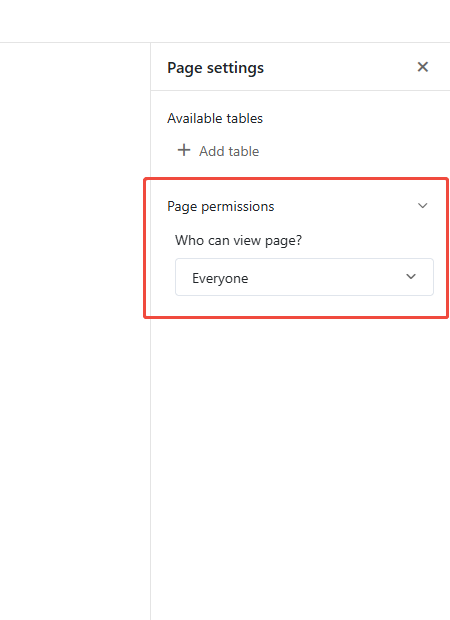
Just to clarify on point #1 — you can already restrict page access using the “Who can view page?” setting in page permissions. Here is where you can find it:


 in your row comments
Important upgrade information