I encountered a bug at the end of October, but everything worked fine before that.
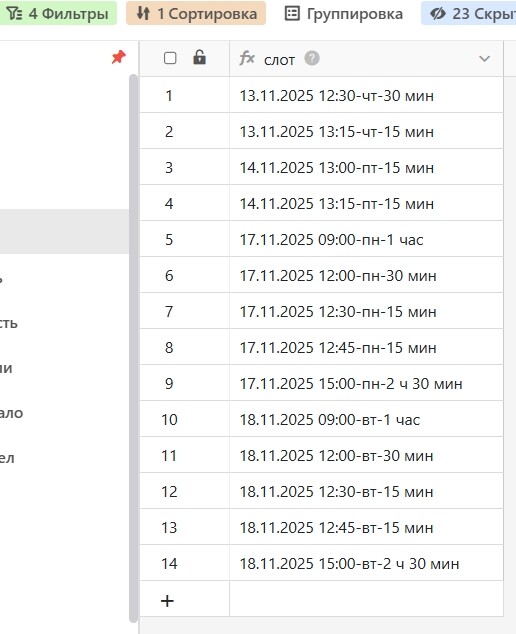
Table 1 contains a monthly schedule, which is sent via Lookup App to Table 2, where entries for this schedule are made via a form.
The form only displays a portion of the schedule, which is highlighted in a separate view in Table 1. In this separate view, the portion of the schedule is sorted by date.
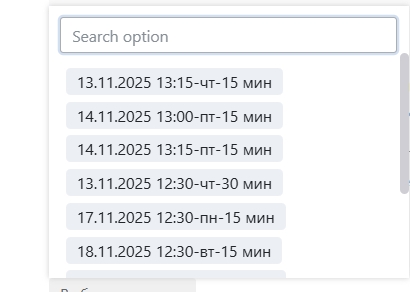
However, when selecting the desired date in the form, the schedule is arranged chaotically. That is, the form doesn’t recognize the sorting in the view, making it extremely difficult to select the desired date.
Please help me normalize the relationship between Table 1 and the form for sorting.
Please provide screenshots or more explanation. It is not self-explanatory what you are trying to do.
And this is how it’s currently displayed in the form.
Previously, this data was displayed identically in both the view and the form.
This appears to be a bug.
Please use the sort function in the linked records dialog to put the linked records the same order as in the view.
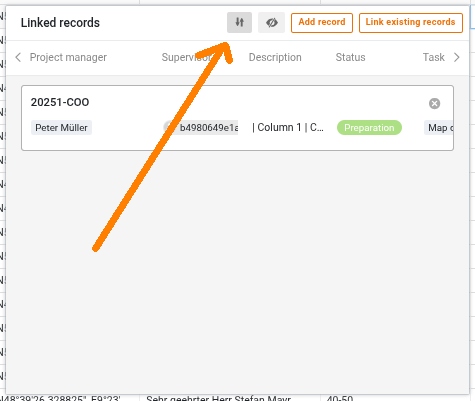
I also enabled this feature, and it sorts correctly in the table, but not in the form. But sorting worked in the tables anyway, but not in the form.
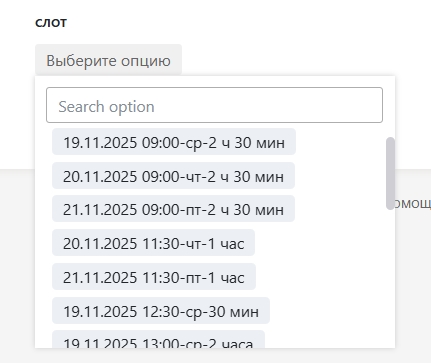
Through trial and error, I discovered:
- if a schedule with dates is created in Table 1,
- it is transferred to Table 2,
- dates are selected through a form from Table 2,
- then sorting by dates in Table 1 is not transferred to the form,
- dates in the form are displayed based on the time the row was created.
This is very inconvenient. Perhaps a service can solve this problem?
This topic was automatically closed 90 days after the last reply. New replies are no longer allowed.
