I have the weird phenomenon with currently one user (out of about 400) which cannot bei seen from the sharing dialog. The user can log in (against our LDAP / AD), can use Seatable, create bases, share them to others, can be invited to bases using a link. The user also appears in the Admin backend.
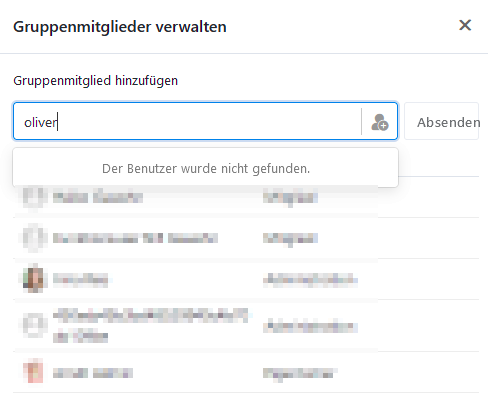
However, the user cannot be seen from the “direct sharing” or “group administration” dialogues:
In the background, the https://myserver.tld/api2/search-user/?q=oliver XHR call just returns an empty array. I tried everything I could think of:
Use different browsers
Erase the user completely, and have him log in again
Couldn’t find any other users which behave similar
Even checked the ccnet_db.EmailUser and dtable_db.profile_profile to find any obvious differences to other users
So here’s my question: Is there any way I can debug (log files etc.) the /api2/search-user/ API call. i imagine that that is the culprit.
Added information: On our test system which is largely similar (same user base from LDAP), the same user can be found with no problem. Assuming a corrupted user entry in our production system, I’d really like to find the problem in order to assure reliability.
It turns out for historic reasons unknown, that I have a lot of entries in the dtable_db.profile_profile table that have no equivalent entry in the ccnet_db.EmailUser table (as linked between the email and user columns).
Talking SQL - this statement reveals all these orphan entries in dtable_db:
select dtb.nickname,dtb.user,cdb.email
from dtable_db.profile_profile as dtb
left join ccnet_db.EmailUser as cdb
on cdb.email=dtb.user
where isnull(cdb.email);
First questions:
Should this statement per definition create an empty list, i.e. every single entry in profile_profile should match one in EmailUsers?
Does anyone else have a system with a non-empty list when running the above SQL statement?
I cannot exactly tell what the origin of these entries are; maybe they come from some faulty or changing LDAP login, maybe they originated from bugs in previous Seatable versions. However, those ophan entries come in different types:
One or multiple entries in profile_profile, and not a single corresponding entry in EmailUsers
They are obviously residue from users that have been deleted, but remained in profile_profile
One or more valid records with corresponding records, and lots of orphans in profile_profile
Those where the ones that blocked the re-usage of E-Mail-Addresses in my other post.
The orphans seem to creep up in quite some numbers - the record was 40(!) for one user
Second set of questions towards Seatable
Is this a known problem, or by design? At least when a user is deleted, are entries purged both from the EmailUsers and profile_profile tables?
Should there be no ophans in profile_profile?
Can I fix this safely with the following SQL statement?
/* non-destructive: Set Nickname to something nobody will search for */
update dtable_db.profile_profile dtb
left join ccnet_db.EmailUser cdb
on cdb.email=dtb.user
set dtb.nickname = 'jljsdjlmi8hjwej'
where isnull(cdb.email);

/* destructive: Delete orphans */
delete from dtable_db.profile_profile
where dtable_db.profile_profile.user not in
(select distinct ccnet_db.EmailUser.email from ccnet_db.EmailUser);
Finally comes the explanation how this relates to the original post: The API endpoint /api2/search_user/ seems to have a limit of 10 entries to retrieve from the profile_profile table when making a quick lookup in the “share” dialogue. This, in my case, returns 10 orphans, and not the valid one from the table. Only then are the 10 entries from profile_profile validated again EmailUsers - resulting in NO results.
After I found out how this works, I found more users where this applies.
Thanks! That’s enough for me to keep going until you have researched the main issue. I assume that you run much bigger systems than I do. If you don’t have the same phenomenon, and nobody else does, that’s probably a problem caused by our sometimes unstable LDAP / AD integration.
If you find the same issue in one of your own systems, you should have enough data for debugging.
Do it like thousands of other people who have used SeaTable to develop powerful processes and get their ideas and tasks done more efficiently.