Hi @Damien,
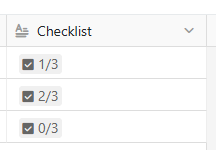
You could actually use the formula if(iserror(search("[ ]",{Checklist},1)),"Completed","In progress") which might do the job… To explain how it works, it actually looks for the [ ] characters (unchecked checkbox) in the content of your Checklist column.
If found, it return false (the search function actually returns the position of the first found item in the string, which is not an error > the iserror function returns false)
If not found (every checkboxes are checked), the search function return an error (because no valid position were found) > the iserror function returns true).
Please note that as the formula is based on the search of the [ ] characters which is the markdown representation of an unchecked checkbox, it won’t work anymore if you use this pattern elsewhere in your Checklist row content!